
My Favorite Writing Software and Downloads (And Why I Love Them)
Writing is among the least expensive hobbies out there - so long as you focus on actual writing, and not tools, toys, seminars and other accoutrements that more often than not, keep us from writing. But it’s a rare aspiring writer who can resist the search for shiny new tools - and I found a few real gems this year.
1.
 In fifth grade, Miss Duncan taught us to use index cards to take notes and organize our reports and papers. There was something immensely satisfying about moving those cards around just so… shifting a quote here, a notation there. As an adult, I’ve longed for a means of organizing my thoughts that way - hopefully one that accounted for my now-horrific hand writing.
So when I discovered this nifty little software program that works with virtual index cards that actually look like index cards, I got pretty excited. You can create piles of cards, move the piles within one another, re-order the cards, tag and sort the cards with keywords, color them, mark them according to the intensity of the scene, and so on.
It’s really quite cool.
The free trial version supposedly limits the number of cards you can use per project, but I haven’t hit that limit yet. I did notice that at a certain point, each new card will prompt you to purchase the program, annoying but workable while I decide for sure whether or not I’m ready to plonk out 29.99 for it — but to be honest, it’s tough to imagine not buying it. Check it out at http://www.mindola.com/products.html
2.
 Holly Lisle’s Character & Plot Clincs
Over the years, I’ve looked over a lot of plot and character development books, tools and worksheets, and quite honestly? They all sucked. So when my friend Kimi (who runs the Tale-Chasing writing podcast) first told me about Holly Lisle’s ebook and audio clinics, it sort of went in one ear and out the other.
But when I went rummaging around for NaNo tools last week, I ran across them again, and discovered they were actually *gasp* helpful. So I downloaded the ebooks, printed them out, and they became my primary inspirations for actually preparing for NaNo.
The Character Clinic takes a much deeper approach to development than the usual worksheets. Instead of asking for dry facts like “where does he work” the ebook walks through a series of flow charts, starting with the character’s compelling need (ala Maslow’s hierarchy) and asking questions about how that need manifests in their life.
But it was the Plot Clinic that really inspired me - there’s something about Holly’s presentation style that just kicks my brain into gear, and as I read, the plot just sort of tumbled out onto the page. One of the best tools in this one are the plot cards - index cards with briefly jotted notes about each potential scene… then they can be arranged and shuffled at will.
At last! My beloved index cards, turned into fiction writing tools. Combined with SuperCardNotes, I’m pretty much in heaven.
Holly’s “Create A Plot Clinic” and “Create A Character Clinic” are available as downloadable e-books for 9.95, or you can get a printed version from LuLu for 19.95. (If you go through the links on Kimi’s site, Tale-Chasing, she gets a commission, and I’m sure she’d be grateful, though she doesn’t know I’m telling you so)
3.
I found this one during last year’s NaNoWriMo, and it’s flexibility was largely responsible for my meeting the 50,000 word goal. At it’s core, it’s just a word processor, of course - except that it allows you to create chapters and scenes entirely out of order, while allowing you to easily reorder them through the sidebar menu.
If you naturally write in a linear fashion, beginning at the beginning and ending at the end, an ordinary word processor will do just fine for you.
If you’re organized enough to manage individual files for each chapter and scene, keep them all in order and properly filed and named, you’ll probably not see much of a point in this software.
But if you write like I do, madcap and out of order and in sixty directions at once, it’s indispensable. It’s especially handy for NaNo, since it allows you to track word count either scene by scene, or as a complete file… so I could track my daily additions easily to keep my word count totals updated. It’s not cheap at 49.95, and the trial version won’t let you save your work, so it’s pretty well useless unless you buy it. But a year later, I’ve found it well worth the investment.
Check it out at http://www.ravensheadservices.com/index.php
Another similar option is PageFour, which runs $34.95 and has a more functional demo. Since I already use WriteItNow, I haven’t spent much time with it, but it looked promising.
 4.
4.
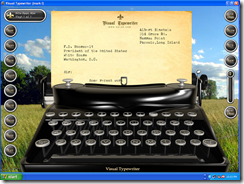
Visual TypeWriter:
Ok, this one is just plain fun. Instead of a standard, dull word processing screen, you’re faced with a good old fashioned manual type writer — complete with carriage returns, overstrikes, and the clackity clack of keystrokes.
There’s a variety of paper types to load, and even add on stationary packs that you can download. The program comes with a number of background images loaded, so you can type in among amber waves of grain, ride off into the sunset, journal your way down the road to nowhere, or add your own images.
Really, there’s no real usefulness here, unless, of course, you count a change of pace, inspiration and creativity as “useful” (And I do!)
The software will run you 19.95, but there’s a free 2 week trial period, and if you get stuck midway through NaNo, the trial might just get through the rough spots!! You can get your own Virtual Typewriter here: http://www.nolad.com/index.php
I’m resisting registering my copy, so far… though no promises once I’m a bit further into the noveling process!
There you have it. My top software picks for NaNo ‘08. Have any writing favorites you want to share?
I’m such a sucker for this stuff…
Update: You should also give Ywriter a look. It’s extremely popular with NaNo’ers, comes highly recommended by Kathy (see the comments below!) and.. It’s FREE (yay for free!)






{ 11 comments… read them below or add one }
Very cool tools. I’ve looked them over and like the one where I can keep track of characters etc.
I’ve figured that if I write 1500 words a day I will make the target. I’ve decided to ignore conformity and go for free form. Its a good experience doing just that and Nancy Goldberg would be proud of me. I’ve got 1690 words so far but as of yet I’ve been unable to upload my word count. How about you Tori? I was able to see you as my buddy and your word count. I’m assuming you had as much trouble as me getting into the site. I’ve tried 5am, midnight and again 8am today. No luck. Oh well.
Yay Maureen!
I’m at 1055 well-hated words so far, and no clue why I’m so incredibly grumpy about it all of the sudden. I’m pondering just roughing out the whole darn thing in SuperNoteCard, one rough line at a time.
I have barely been able to get onto the NaNo site for days, so I haven’t added any new buddies yet, much less started the MindTweaking thread over there - things should ease up by the end of next week, when writers start dropping out.
Nancy Goldberg! Yay! I have a mini copy of Writing Down The Bones somewhere.. think I’ll go dig it up and plonk it in my notebook, too : )
[...] behind since I’ve gotten sick. Not sure if its a cold or the flu. I used MindTweak’s suggestion to use WriteItNow as the software program for writing my NaNo book. It’s working [...]
I am a super start at the start and end at the end type. For me I’m the first person tor eadas I write - it’s allt he fun for me. So a word processor is my friend. I use Ubuntu and Open Office becuase of the vertual environmetns I have six desk tops set up with my tools and notes in five and my novel open in six the other four are where I do my work but at any time I stop and write instead.
Have you tried Spacejock’s “yWriter4″? This is a fantastic novel writing software. I’ve tried and bought, many different softwares over the years and I always come back to yWriter. Simon (the guy who developed the software) is a writer himself. He also does NaNo each year. AND what’s more…His software is free. (Man. I sound like a advertisement!) I just can’t say enough about the all the software he offers. Check it out if you have a minute: http://www.spacejock.com/
Happy Writing,
KathyP
Hi Kathy! I did try yWriter last year, and mentioned it then, I think. I love that it’s free, and he has lots of good stuff, but somehow didn’t click for me. I’m very visual/intuitive when it comes to writing, and the “look” of the software somehow matters - thus why I was so tickled by Visual Typewriter.
But anyone who’s testing out writing software should give yWriter a try, it’s hugely popular, and as Kathy said, free : )
So I’ve downloaded yWriter but after exploring it I figured there was no place to actually write. Am I using it wrong? I’m not that methodical when I write but I can see the virtue of having stuff organized somewhere. I tried outlining what I wanted to do and sat staring at my laptop for four days. When I took out the pen and paper…away I went. I believe that there is no actual writing that goes on in yWriter and it seems so counter-intuitive to me. Am I using it wrong?
Open ywriter. Start a new project. Fill in the necessary blanks. When you get to the main screen, click on add a chapter. From there, click on add a scene. When the scene box comes up… You write in there, in the scene box. Don’t forget to save before exiting.
I’ve used it for so long, that I don’t think about it anymore. Why I like it…You can add your characters and keep track of them by scene or even by word count. You can outline by actually just adding chapter after chapter, scene after scene. Just name the scenes as ideas come. And you can drag and drop scenes and chapters even after you’ve written them. You can keep tract of word counts. You can check for specific word useage. user entered or programed specific like words ending in “ly”. These are just some of the easier stuff to do. It does much more. Just remember to save.
Everyone finds their own nitch. yWriter seems to be mine, but I am always open and trying new programs.
Good luck and happy writing.
Thanks Kathy. I have yWriter4 and it has: Create a New Scene and then this teeny box with teeny print comes up. So I tried going to Scenes and Add a Scene was an option. Once I created a chapter I highlighted it in the left side bar and clicked on Add a Scene. I was able to resize the text box and change the font type and size. BUT I never would have figured that out without you. THANKS!
Simon is pretty cool. If there is something you think would make the program easier to use or something to add to the program, just email him and let him know. He is open to suggestions. Back when he started yWriter, there was something(I don’t remember now) that I thought would go good in the program, and next time he did an update - it was in it. I thought that was kind of neat.
@KathyP I love when programmers and designers are that responsive to user comments/suggestions : )
And I’ve added the suggestion of Ywriter to the text of the post, and thanks for helping Ms.Whizmo out : )